


 Canada
 Best Seller
 Thermal Printers
 All PDAs
 All Thermal Labels
When shopping for a thermal label printer, you'll quickly notice that resolution gets thrown around as a selling point. But here's the truth: not every business needs 300 DPI printing, and jumping to higher resolution isn't always worth the extra cost.
Let's cut through the marketing noise and talk about what DPI actually means for your shipping labels, barcodes, and product stickers—and more importantly, whether upgrading makes sense for your operation.
What DPI Actually Means
DPI stands for dots per inch. It's a measure of how densely a printer can place tiny dots on a label. A 203 DPI printer creates dots at 203 pixels per inch, while a 300 DPI printer packs 300 pixels per inch into the same space.
Think of it like the difference between a 1080p and 4K monitor. One is sharper, but if you're sitting 10 feet back, you won't notice.
With label printing, the comparison is similar—practical rather than dramatic. At normal viewing distance, a well-maintained 203 DPI printer produces clear, scannable labels. A 300 DPI printer produces slightly sharper output. The real question isn't whether you can see a difference, but whether that difference changes how your business operates.
When 203 DPI Is More Than Enough
A 203 DPI label printer works perfectly fine for:
Standard 4×6 shipping labels. Most carriers—UPS, FedEx, USPS—read barcodes and QR codes just fine at 203 DPI. Unless you're printing microscopic fonts or ultra-dense barcodes, you're covered.
Inventory and warehouse tags. If you're labeling boxes, pallets, or storage bins, your team doesn't need photography-grade clarity. Legibility is what matters.
Small business operations without high-volume requirements. Printing 50 to 200 labels a week? 203 DPI is perfectly adequate.
Basic text and simple graphics. Straight lines, solid colors, and standard fonts all look clean at 203 DPI. The resolution gap becomes obvious only when printing fine detail or small text.
For these scenarios, spending on higher resolution is genuinely hard to justify. You'll get a good return on that money by investing in labels themselves, or parking it elsewhere in your business.
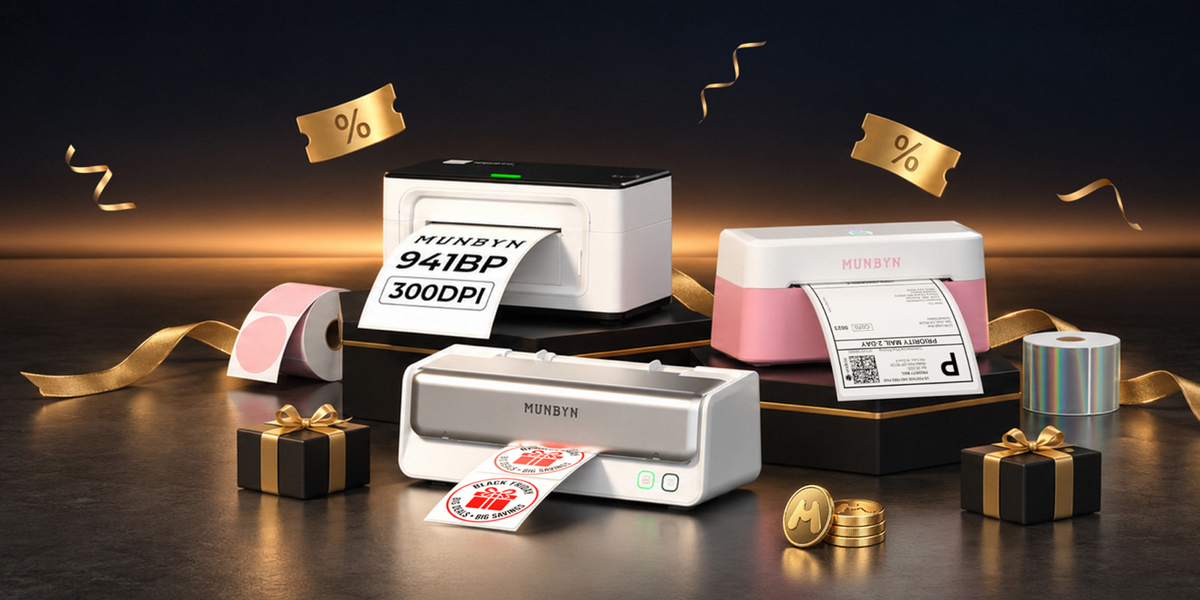
The MUNBYN RW403B is a practical example. At 203 DPI with Bluetooth connectivity and a price point of just $79.99 (The price will change according to the website's promotions), it handles everything an emerging e-commerce business needs. Print speed is solid at 150 mm/s—one 4×6 label per second—and the built-in DAC (Dynamic Auto-Calibration) technology ensures alignment stays sharp without manual tweaking. If you're running Shopify, Etsy, or Amazon, this printer connects seamlessly.

When 300 DPI Makes a Real Difference
Higher resolution becomes worthwhile when:
You're printing small text or fine details. Product labels with ingredient lists, warnings, or tiny brand information stay crisp and readable at 300 DPI.
Barcode density matters. If you're printing QR codes, 2D barcodes, or high-density code 128 barcodes at smaller sizes, 300 DPI ensures reliable scanning even as label size decreases.
You're creating branded or decorative labels. Custom stickers with fine logos, patterns, or multi-color graphics look noticeably more polished at higher resolution.
Your label supplier requires it. Some brands and retailers have specific resolution requirements for product labels or return labels. Check before you buy.
You're printing labels that sit in retail environments. If end consumers see your labels on shelves or products, and brand perception matters, the extra crispness is worth the investment.
High-volume operations need consistent quality. Larger operations often use 300 DPI as a baseline to ensure zero issues across millions of labels annually.
The MUNBYN RW941BP 300 DPI printer addresses these needs directly. Priced at $129.99 (The price will change according to the website's promotions), it offers the same Bluetooth convenience and platform compatibility as lower-resolution alternatives, but with crisper output that holds up under magnification or small text. It shares the same 150 mm/s print speed, so you're not sacrificing throughput for quality.

The Cost-Benefit Reality
Here's what most people miss: printer cost is just the beginning.
A 203-DPI label printer costs less upfront, but both models use the same thermal label supplies. Your ongoing label expenses are identical. The hardware difference of $50 spreads across potentially hundreds of thousands of labels, making the per-label cost trivial.
The real savings kick in in your overall printing workflow. Both 203 and 300 DPI thermal printers eliminate the need for ink and toner cartridges. You're replacing only the labels themselves—no more ink cartridges, no more jammed print heads from dried-out nozzles.
If you switched from inkjet to thermal printing, you've already won the cost game. The jump from 203 to 300 DPI is marginal by comparison.
Other Factors That Matter More Than DPI
If you're choosing between printers, look beyond resolution:
Print head lifespan. A printer with a 150 km printhead lifespan delivers roughly 980,000 4×6 labels before replacement. That's years for most businesses. Check the spec sheet.
Connectivity options. Bluetooth matters. USB-only printers create cable clutter and limit flexibility. For Apple users, MUNBYN AirPrint label printers let you print directly from your iPhone, iPad, or Mac with zero setup.
Automatic label detection. The best thermal printers auto-detect label sizes. You switch from 4×6 shipping labels to 3×2 inventory tags without recalibration. This saves time daily.
Alignment quality. DAC technology (Dynamic Auto-Calibration) prevents the skewed labels that frustrate warehouse teams. It's a quality-of-life feature that matters more than raw resolution.
Platform compatibility. Does your printer play nicely with Shopify, eBay, FedEx, and Amazon? Not all thermal printers integrate equally. Verify before buying.
The Practical Answer
Most small-to-medium businesses don't need 300 DPI.
If you're printing standard shipping labels, basic inventory tags, or simple text stickers, a 203 DPI label printer serves you well and leaves extra cash in your pocket. The RW403B proves this—thousands of small sellers use it without complaint.
If you're printing retail-facing labels, working with dense barcodes, or producing high-volume batches where consistency matters across thousands of labels, the upgrade to 300 DPI is worth considering. The RW941BP represents this tier—professional output without enterprise-level pricing.
The real waste isn't choosing 203 DPI when you don't need 300. The real waste is choosing wrong based on marketing hype instead of your actual printing needs.
One Last Thing: Don't Overlook the Printer Features
Resolution is important, but it's one variable. Look at the warranty (both models offer 2-year coverage, which is solid), customer reviews, and real-world reliability reports.
Test print samples if you can. Most decent printer companies provide sample labels so you can see actual output before committing.
And remember: the printer's only as good as the labels you feed it. Cheap labels jam, skip, or smudge regardless of DPI. Invest in quality thermal labels compatible with your label printer model. 203 DPI gets the job done for most operations. 300 DPI adds polish when you need it. Choose based on what you actually print. Use the code "MYSEO" at checkout to enjoy an extra 8% off now!
Share:
Money Counter: UV, MG, IR, CIS Counterfeit Detection Explained
Best Shipping Label Printer for Shopify Stores