


 Canada
 Meilleure vente
 Toutes les imprimantes
 Tous les assistants personnels (PDA)
 Toutes les étiquettes thermiques
 Halloween is the perfect time to get creative, whether you are preparing a family craft afternoon, organizing a themed party, or putting together small treats for friends and neighbors. From playful ghost stickers to personalized candy bag labels, a few simple DIY projects can make your Halloween preparations more memorable.
With the right printing tools, you can create personalized designs at home without making every project complicated. An AI sticker printer can help bring children's ideas to life, while a thermal label printer makes it easier to prepare neat labels for party favors, gift packaging, and seasonal organization. Here are six Halloween DIY ideas to inspire your next creative project.
1. Make Your Own Halloween Stickers
Halloween stickers are a simple way to decorate notebooks, greeting cards, treat bags, and craft projects. Classic motifs such as pumpkins, ghosts, bats, black cats, and candy corn are easy to adapt to different styles, from cute and playful to spooky and mysterious.
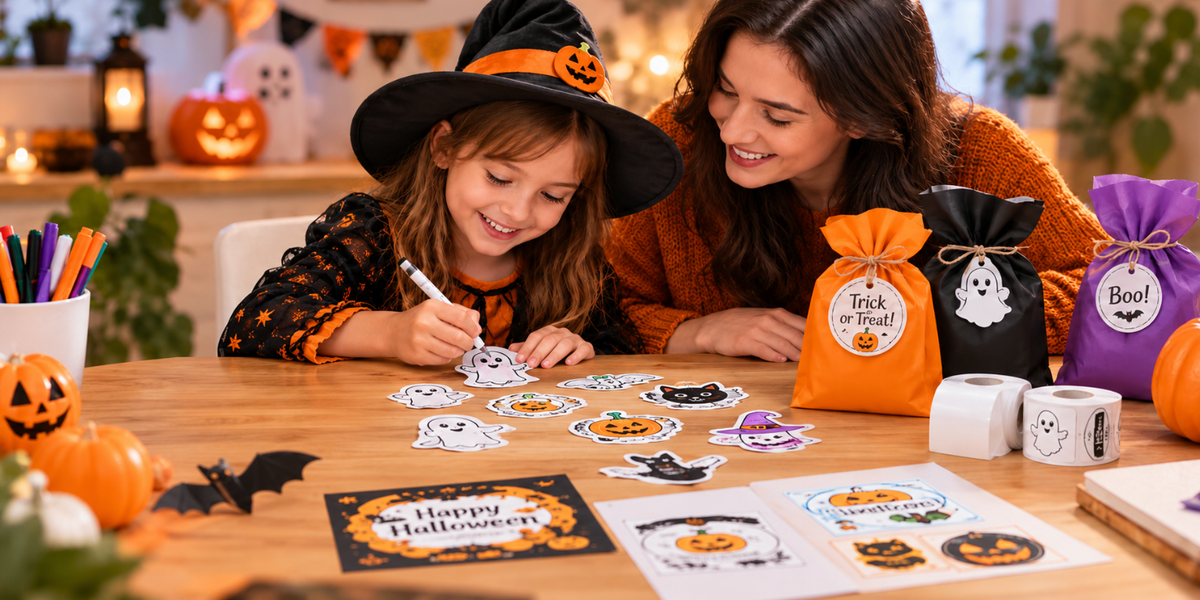
For a family-friendly activity, start by asking children to describe the Halloween character they would like to create. They might imagine a smiling ghost wearing a witch's hat or a pumpkin with a funny expression. Turn these ideas into sticker designs, print them, and let the children add their own colors and details.
The MUNBYN SP01 AI Sticker Printer for Kids offers a creative way to explore this activity. Children can describe their ideas through voice interaction and turn them into black-and-white sticker-style designs. The printed stickers can then be colored and personalized with markers, combining AI-assisted creativity with hands-on crafting.
To make the activity more engaging, consider these ideas:
- Create a Halloween character collection: Design a series of ghosts, pumpkins, bats, and friendly monsters.
- Decorate greeting cards: Add handmade stickers to Halloween cards for friends and family.
- Personalize notebooks: Use themed stickers to decorate journals, school supplies, or craft folders.
- Make a sticker scavenger hunt: Hide printed character stickers around a room and invite children to find them.
This project is particularly suitable for families who want to turn a simple printing activity into an opportunity for imagination, storytelling, and creative play. It's a perfect Halloween Gift for your child.

2. Create Personalized Halloween Candy Bag Labels
Individually prepared candy bags are a popular choice for Halloween parties, classroom celebrations, and neighborhood trick-or-treat activities. Personalized labels can make even simple packaging feel more thoughtful. Begin with plain paper bags or treat containers, then design labels featuring short seasonal messages such as:
- “Trick or Treat!”
- “A Little Halloween Treat”
- “Boo! Enjoy Something Sweet”
- “Made for a Spooky Night”
For a coordinated look, use a limited palette of black, orange, white, and purple in your overall packaging design. Simple ghost outlines, pumpkin illustrations, and spiderweb patterns can add a festive touch without making the labels difficult to read.
A thermal label printer is useful when you need to prepare several labels with consistent text and sizing. Depending on your printer and label format, you can create designs for individual treat bags, party favor boxes, or small gift packages. Explore the MUNBYN thermal label printer collection to find a printer suited to your labeling needs. You can also browse MUNBYN thermal labels for different sizes and formats.
Before printing a large batch, check the dimensions of your bags and containers. Choose a label size that fits the available space, and test one label first to make sure the text remains clear and legible.
3. Design DIY Halloween Party Decorations
A cohesive theme can make a Halloween gathering feel more inviting. In addition to traditional decorations, printed labels and small signs can help bring the details together. Consider incorporating the following ideas into your party setup.
- Snack and drink labels: Create simple labels for snack tables, drink stations, or dessert displays. Seasonal names such as “Witch's Treats” or “Monster Snacks” can add personality to the presentation. If food allergies are a concern, keep ingredient and allergen information accurate and easy to read.
- Party favor labels: Add a small “Thank You for Coming” message to gift bags for guests. A ghost or pumpkin icon can make the design feel festive without requiring elaborate artwork.
- Craft station labels: If you are hosting a children's party, label different activity areas for sticker coloring, pumpkin crafts, or card making. Clear labels help guests find materials and keep the event organized.
- Storage labels for reusable decorations: After the celebration, use labels to identify boxes of Halloween decorations, craft supplies, or party accessories. This makes it easier to organize items for next year.
For these projects, a thermal label printer can produce consistent black-and-white text and simple graphics. Most direct thermal printers print in black only, so you can introduce color through colored label materials, colored packaging, ribbons, and other decorative elements. For inspiration and available options, visit the MUNBYN printer collection.

4. Plan a Fun Halloween Craft Session for Kids
Halloween offers plenty of opportunities for children to explore their creativity. A short craft session can be a welcome alternative to passive entertainment, especially when children can turn their own ideas into physical creations. You do not need an elaborate setup. Prepare a table with paper, markers, compatible sticker supplies, and a few Halloween-themed examples to get started. Here is a simple activity plan.
- Step 1: Imagine a character. Ask each child to invent a Halloween character. It could be a friendly vampire, a pumpkin astronaut, a tiny monster, or a ghost who loves books.
- Step 2: Turn the idea into a design. Children can describe their ideas using the SP01 AI sticker printer's voice-based creation feature. Encourage them to experiment with different characters and expressions.
- Step 3: Print and personalize. Once a design is ready, print the black-and-white sticker and use markers to add colors, patterns, or extra details.
- Step 4: Create a mini story. Invite children to arrange their stickers on a card or sheet of paper and invent a short story about the characters. They can share their stories with family members or friends.
The MUNBYN SP01 AI Sticker Printer is designed to make this type of creative activity more accessible. Its inkless thermal printing process eliminates the need for ink cartridges, while the black-and-white output gives children an opportunity to personalize their designs by hand. As with any children's craft activity, adults should supervise the use of scissors, markers, and other craft materials as appropriate for the child's age.
5. Add a Personal Touch to Halloween Gift Packaging
Small Halloween gifts do not need elaborate wrapping to feel special. A simple paper bag, a ribbon, and a personalized label can create an attractive presentation for party favors, homemade treats, or small seasonal gifts. Start by choosing a packaging style that suits the occasion. Kraft paper bags offer a natural look, while black or orange packaging creates a more traditional Halloween atmosphere. White labels can provide contrast, and colored labels can introduce an additional decorative element.
Next, choose a design that fits the available space. A small pumpkin icon paired with a recipient's name may be enough for an individual gift. For party favors, a short seasonal message or a consistent design across all packages can create a more coordinated presentation. A thermal label printer can be particularly useful when preparing multiple packages. You can print a series of labels with the same design or adjust the wording for different recipients.
MUNBYN offers a range of thermal labels in different sizes and formats. When selecting supplies, check that the label type, dimensions, and loading format are compatible with your printer. For home-based businesses and small shops, the same approach can also be adapted to seasonal product packaging. A clearly printed product name, logo, or thank-you message can help create a consistent presentation for Halloween orders.
6. How to Choose the Right Printer for Halloween DIY
The best printing tool depends on what you want to make. Before choosing a printer, consider the types of projects you plan to complete, the materials you need, and how many items you expect to print.
- For children's creative sticker projects: An AI sticker printer such as the MUNBYN SP01 is worth considering if your priority is turning imaginative ideas into printable sticker designs. Its black-and-white output is suitable for coloring activities and personalized craft projects.
- For party labels and gift packaging: A thermal label printer is a practical option for printing consistent text, simple graphics, and labels in different sizes. It can help prepare candy bag labels, gift tags, and packaging labels, depending on the printer's supported media and format.
- For different label sizes and materials: Review the MUNBYN thermal label collection before purchasing supplies. Consider the shape, dimensions, material, and intended use of each label, and confirm compatibility with your selected printer.
- For recurring home or small-business needs: If you plan to use the printer beyond Halloween, consider how it may fit into your regular activities. A label printer can also help with home organization, product labeling, shipping, and other everyday tasks, depending on the model.
It is worth remembering that standard direct thermal printing does not produce full-color images. If color is important to your Halloween design, consider colored label stock or other decorative materials. Special dual-color printing requires a compatible printer and the appropriate labels. To compare available options, visit the MUNBYN website and explore the printer and label collections.
Frequently Asked Questions
1. What can you make with a Halloween sticker printer?
You can create themed stickers for greeting cards, notebooks, treat bags, craft projects, and seasonal decorations. An AI sticker printer designed for children can also help turn imaginative descriptions into black-and-white designs that can be colored by hand.
2. Can a thermal label printer make Halloween party labels?
Yes. A compatible thermal label printer can produce labels for candy bags, gift packaging, party favors, and activity stations. Choose an appropriate label size and confirm that the label material is compatible with your printer.
3. Do thermal label printers need ink?
Most direct thermal label printers do not require ink cartridges or toner. They use heat-sensitive labels to create printed text and graphics. Always check your printer's specifications and use compatible supplies.
Make This Halloween More Creative with MUNBYN
Halloween DIY projects are a chance to personalize decorations, prepare thoughtful gifts, and spend meaningful time creating with family and friends. From AI-assisted sticker making to neatly printed candy bag labels, the right printing tools can help bring these ideas together.
Explore MUNBYN printers, discover thermal labels for your projects, or learn more about the SP01 AI Sticker Printer for Kids to find an option that fits your Halloween plans. Use the limited-time discount code "MYSEO" at checkout to enjoy an additional 8% off.
Partager:
Best Money Counter for Retail Businesses: How to Choose the Right Cash Counting Machine